
Improving Coral’s 24-Hour Emergency Call Experience
This first draft demonstrates how Kristen, Coral’s 24-Hour Comfort Response Assistant, can improve the current after-hours process by answering the call, calming the customer, collecting emergency details, creating a GHL record, and alerting the team with a clear technician-ready summary.
From Voicemail Instructions to Guided Emergency Intake
Coral already offers a valuable 24-hour emergency service. The opportunity is to make that service easier for a stressed customer to access. Instead of asking the caller to listen to a voicemail, write down another number, hang up, and call again, Kristen keeps the customer on the line and captures the information the technician needs.
Current After-Hours Risk
When the office is unavailable, the caller hears a message explaining the emergency option and is asked to call another number. That works in theory, but it places the burden on the customer at the worst possible moment.
- The caller may be cold, hot, stressed, or dealing with water around equipment.
- They may not have a pen ready to write down the technician’s number.
- They must hang up and make a second call.
- Coral may not receive a structured record of the issue.
- The technician may receive a call without the full context.
AI-Assisted Emergency Intake
Kristen changes the experience. She answers, explains the process, checks for safety concerns, gathers the essential details, and creates a clean handoff inside GHL.
- The caller is reassured immediately.
- Safety concerns are screened before normal intake.
- The customer’s name, phone, address, issue, urgency, and system status are recorded.
- The team receives a readable internal notification.
- The opportunity is created in Coral’s 24-Hour Comfort Response pipeline.
Test Scenario: No Heat Emergency
This first test focused on a realistic after-hours no-heat call. The caller reported that the furnace had stopped working, the home was getting cold, and there were children at home. Kristen correctly treated the request as urgent after-hours service.
What Kristen Handled
In this test, Kristen moved the call through the core emergency intake process and created a usable record for Coral’s team.
- Customer identified: First name, last name, and phone number were captured.
- Service location captured: Street address and city/area were recorded.
- Issue classified: The call was categorized as No Heat.
- Urgency classified: The call was marked as Urgent After-Hours Service.
- Equipment identified: Furnace.
- System status captured: Completely not working.
- Safety screening captured: No gas smell, no water leak, no safety concern reported.
- Vulnerable occupants captured: Children at home.
- Recommended follow-up: Technician callback required.
This first version is a proof-of-concept. The next pass can refine voice choice, pacing, and how often Kristen repeats safety questions.
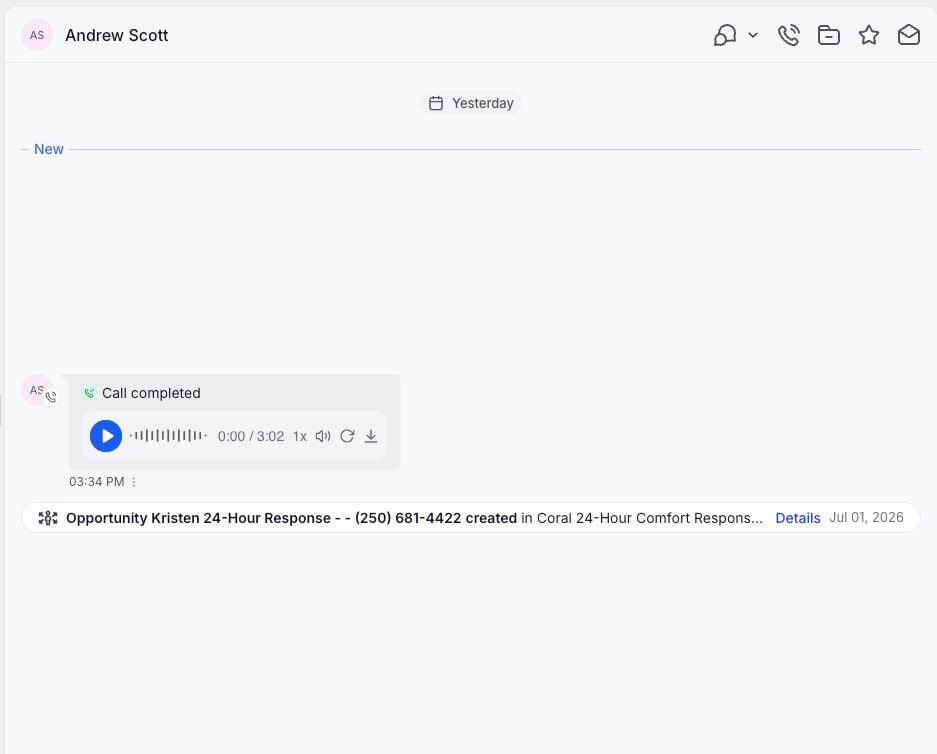
The call recording remains attached to the contact timeline for review and quality control.
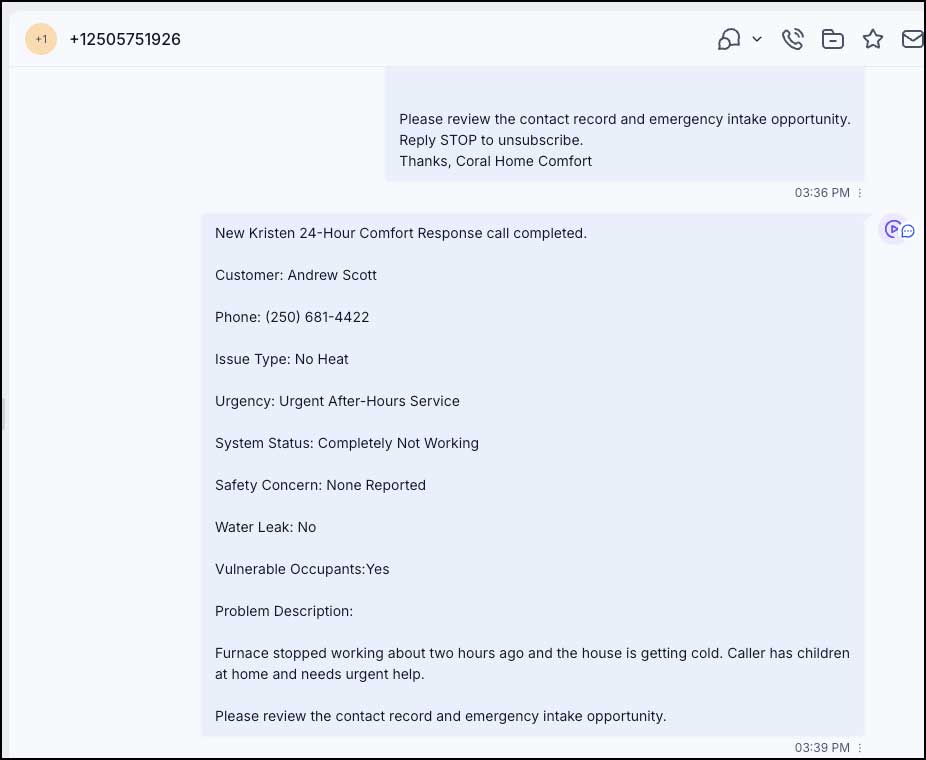
The internal message gives the team the key emergency details without needing to replay the call immediately.
Why This Matters for Steve
This system does not replace the technician. It improves the handoff. The caller gets a calmer experience, Coral gets a structured record, and the technician receives a cleaner picture of what is happening before making the callback.
Behind the Scenes: What Kristen Captures
The following screenshots show how the call becomes structured information inside GHL. This is the operational value behind the customer-facing conversation.
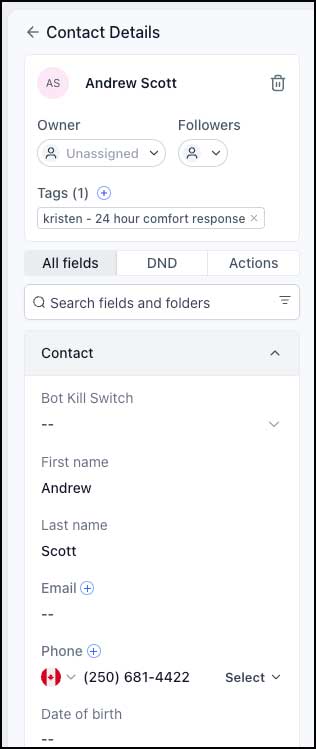
Contact Identity
Kristen updates the contact record with the customer’s name and phone number, creating a clear caller identity for follow-up.
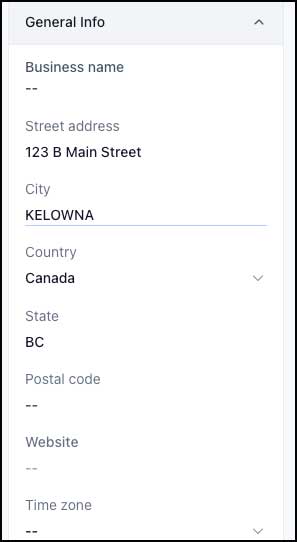
Service Address
The customer’s street address, city, province, and country are saved so the technician or office team has the service location.
Emergency Details
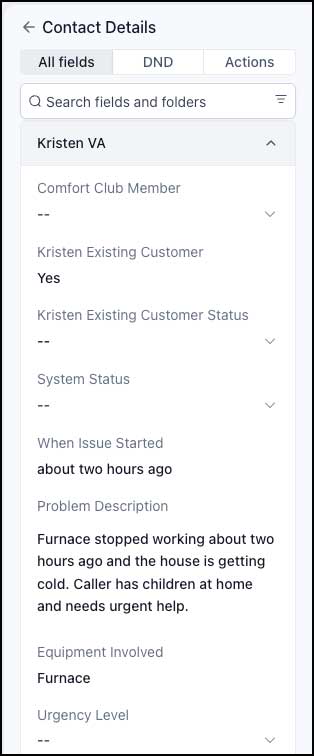
Kristen stores the problem description, equipment involved, when the issue started, and the recommended follow-up.
Urgency and Safety
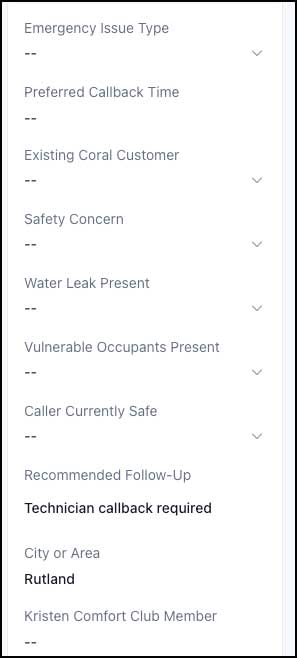
The assistant records urgency, issue type, system status, safety concern, water leak status, and vulnerable occupants.
Technician-Ready Fields
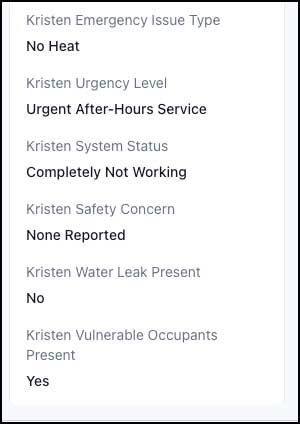
The final field set gives the team a quick operational view: no heat, urgent service, furnace not working, no leak, no safety concern, children present.
Internal SMS / Manager Notification
The manager or designated recipient receives a concise message with the caller, phone number, issue, urgency, safety status, and problem description.
Readable Notes for the Technician and Team
Kristen produces a cleaner custom call summary and GHL also creates an AI-generated call summary. Together, they give Coral a strong internal record of what happened.
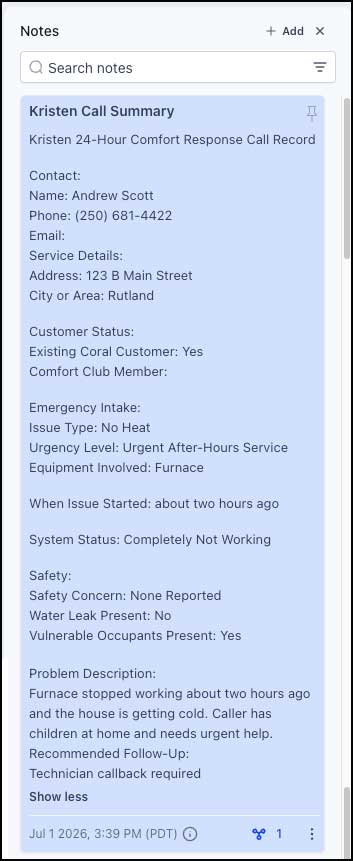
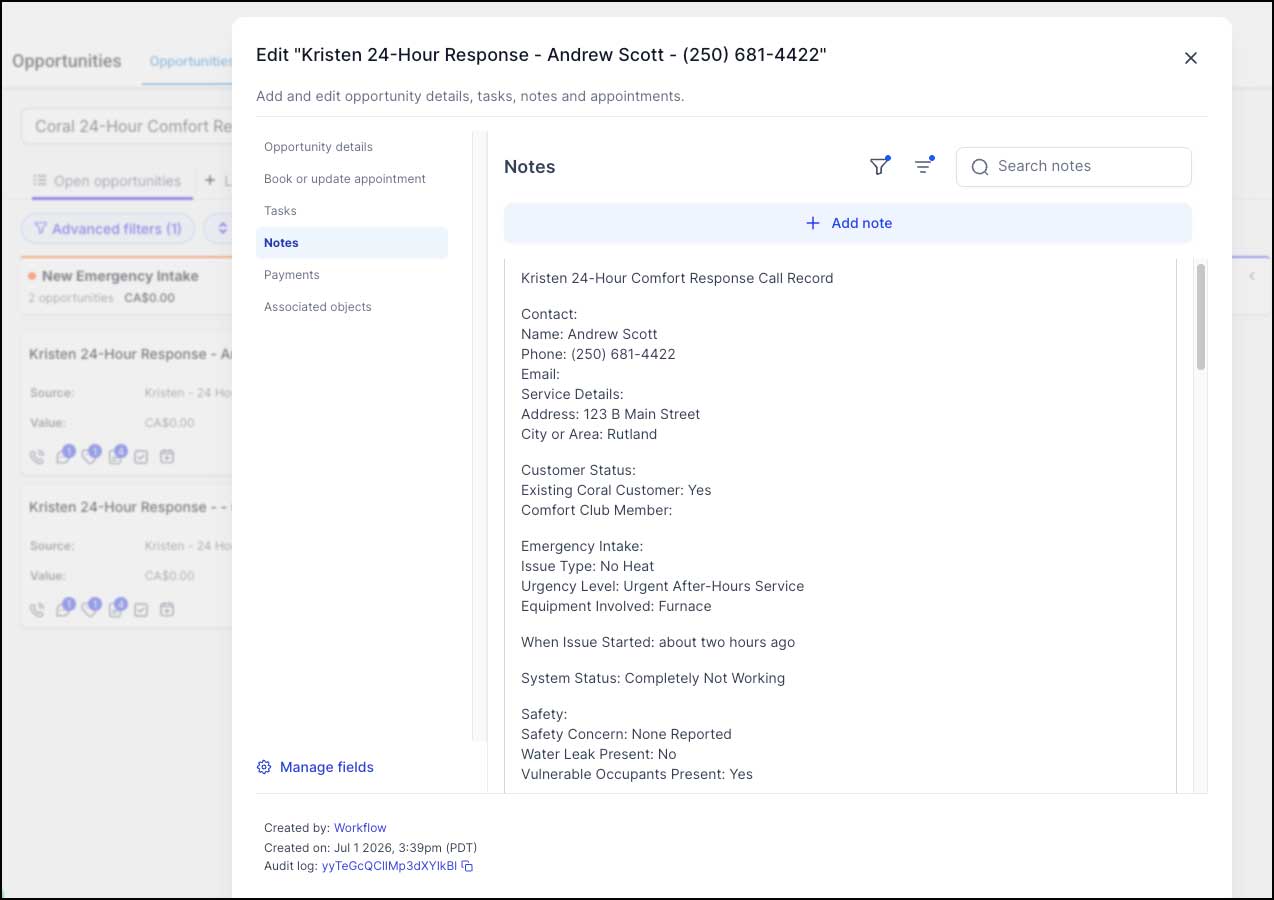
The custom Kristen Call Summary organizes the intake into contact, service details, customer status, emergency intake, safety, problem description, and recommended follow-up.
Kristen Call Summary Includes
- Caller name and phone number.
- Street address and city or area.
- Existing Coral customer status.
- Emergency issue type and urgency level.
- Equipment involved and when the issue started.
- System status, safety concern, leak status, and vulnerable occupants.
- A plain-English problem description.
- Recommended next step for the team.
AI-Generated Summary
The GHL-generated call summary gives a second layer of detail, including the call summary and the fetched fields Kristen extracted during the conversation.
- Summarizes the call in plain English.
- Lists the captured fields in order.
- Confirms the issue type, urgency, safety, water leak, vulnerable occupants, address, and follow-up recommendation.
- Creates a reviewable audit trail for quality control and future tuning.
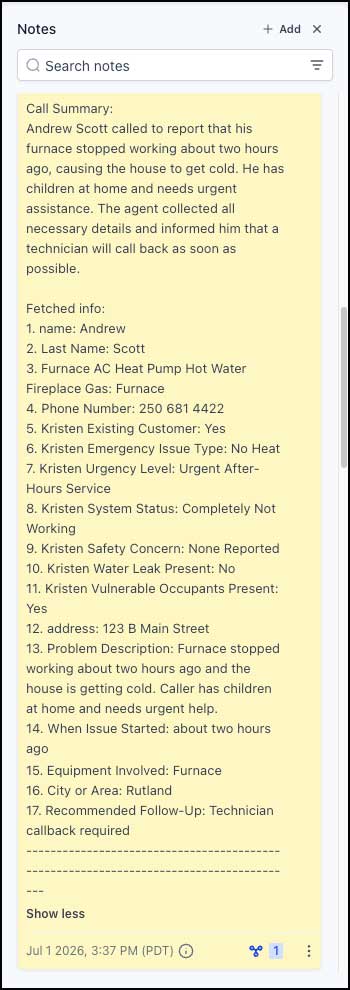
The AI-generated call summary confirms that Kristen understood the no-heat emergency and captured the important details.
Pipeline Visibility: From Call to Emergency Intake
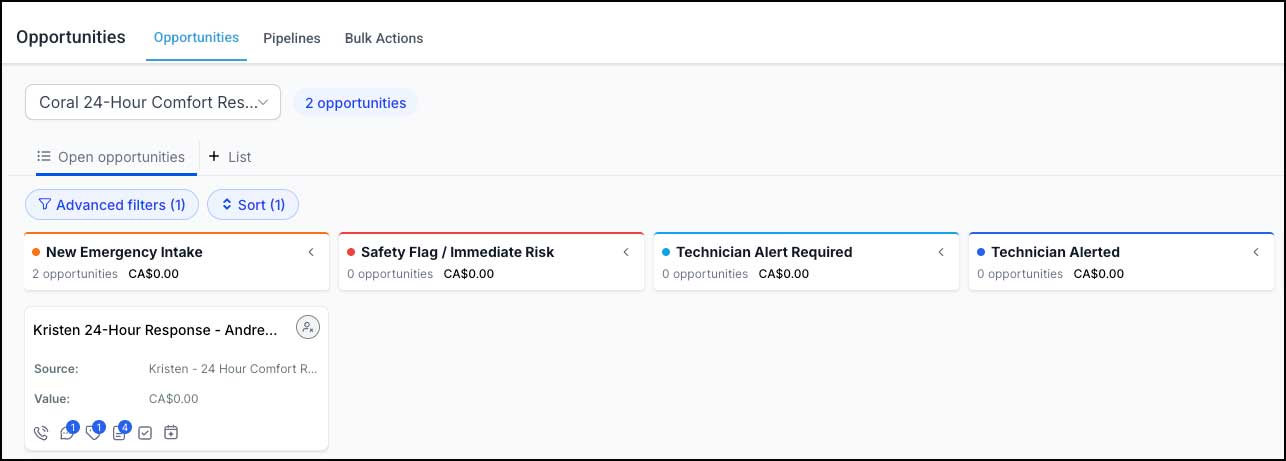
Instead of the emergency call disappearing into voicemail, the call now creates an opportunity in the Coral 24-Hour Comfort Response pipeline. This gives Steve and the team visibility into after-hours demand and follow-up status.
Kristen finishes the intake.
Fields are saved in GHL.
Call details are added to notes.
Request appears in pipeline.
Manager/technician receives details.
New Emergency Intake
The new opportunity appears in the 24-Hour Comfort Response pipeline for tracking.
Opportunity Notes
The opportunity carries the Kristen Call Summary, allowing the team to review the case directly from the pipeline.
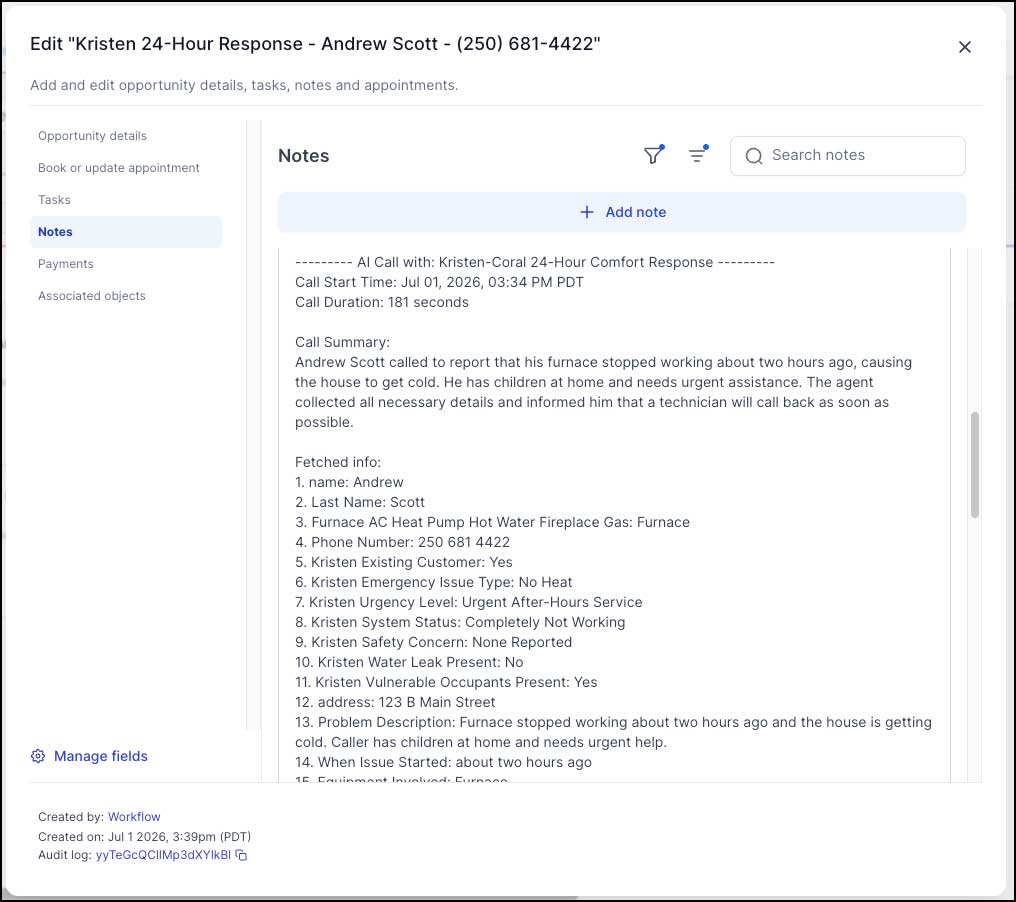
AI Call Record
The AI call summary and extracted fields are also visible in the opportunity record for deeper review.
 New Emergency Intake
Opportunity Notes
AI Call Record
New Emergency Intake
Opportunity Notes
AI Call Record
What We Are Still Refining
This is a first working draft. The next improvements are voice selection, slightly faster pacing, reducing repeated safety questions, improving live transfer logic, adding pipeline stage branching, and testing safety scenarios such as gas smell, carbon monoxide alarms, leaks, AC failure, and non-urgent quote requests.
Features and Benefits of the System
The real value is not just that AI answers the phone. The value is that the call becomes a structured emergency workflow.
Customer Experience Benefits
- No need to write down a second emergency number from voicemail.
- The caller receives an immediate, calm response.
- The assistant asks one question at a time.
- Safety concerns are prioritized early in the call.
- The customer knows their request has been captured.
Operational Benefits for Coral
- After-hours calls create a contact record and opportunity.
- The technician receives cleaner context before calling back.
- Managers can see what happened after hours.
- Emergency calls can be tagged, sorted, and reviewed.
- The system can grow into SMS confirmations and more advanced routing once messaging compliance is ready.
First Draft Result: Kristen Successfully Completed the No-Heat Emergency Intake
This test shows how Coral’s existing 24-hour service can be made easier for customers to access and easier for the team to manage. Kristen answered the call, collected the customer’s details, identified the issue as a no-heat emergency, screened for safety concerns, created a structured GHL record, added notes, created a pipeline opportunity, and sent an internal notification.
Recommended next steps:
- Choose a more mature and professional Kristen voice if available.
- Reduce repeated safety wording while keeping the safety screen intact.
- Add the service address directly into the internal alert message.
- Create workflow branching so safety emergencies move to Safety Flag / Immediate Risk and urgent calls move to Technician Alert Required or Technician Alerted.
- Test additional scenarios: gas smell, leaking hot water tank, AC failure, quote request, maintenance request, and upset caller.
- Decide how duplicate opportunities should behave in live use.
- Prepare A2P/messaging compliance later so customer SMS confirmations can be added when Coral is ready.
The first proof is strong: Kristen turns an after-hours emergency call into a calm intake, a structured service record, and a clearer technician handoff. That is the improvement Steve needs to see.
 Meet Kristen, Tiffany's twin sister