
No Heat, Elderly Parent at Home: Kristen’s Improved Emergency Handoff
This second demo shows how Kristen can move Coral’s 24-hour service beyond voicemail instructions. In this scenario, the caller has no heat, the home is getting cold, and an elderly parent is in the house. Kristen captures the details, sends a wake-up alert to the technician, sends a full post-call summary, texts the customer, and routes the opportunity into the emergency pipeline.
From “Call This Other Number” to “The Technician Has Been Alerted”
Coral’s 24-hour emergency service is already a strong offer. The improvement is in the experience. Instead of a stressed caller having to listen to voicemail, write down a second number, hang up, and call again, Kristen keeps the customer engaged and moves the call into a structured response process.
The Current After-Hours Friction
The current process can work, but it depends heavily on the caller being calm, prepared, and able to capture a phone number while dealing with a home comfort problem.
- The caller may be cold, worried, tired, or calling late at night.
- They may not have a pen ready to write down another number.
- They must hang up and make another call.
- The technician may receive the call without a clear summary first.
- The office may have limited visibility into what happened after hours.
The Improved Kristen Workflow
Kristen gives the caller a calmer path. She collects the details, classifies the urgency, alerts the technician, confirms the customer’s next step, and creates a GHL record for review.
- The caller speaks to a guided response assistant immediately.
- Urgency and vulnerable occupants are captured.
- The technician receives a wake-up text while the call is active or just completed.
- A full summary follows once the call details are populated.
- The customer receives a confirmation text with the callback expectation.
Test Scenario: Furnace Stopped Working
The test question was: “Hi, my furnace has completely stopped working and the house is getting cold. I have an elderly parent here and I need help tonight.” This is a strong emergency scenario because it combines no heat, a vulnerable occupant, and an urgent after-hours callback requirement.
Listen to the Demo Call
The call recording shows Kristen collecting the essentials and explaining that the on-call technician will receive the details and call summary by text.
This recording demonstrates the improved customer promise: the technician is alerted and the customer is told to expect a callback within about five minutes.
What Kristen Captured
- Customer: Andrew Scott.
- Phone: 250-681-4422.
- Address: 4567 Test Avenue, Kelowna.
- Equipment: Furnace.
- Urgency: Urgent After-Hours Service.
- System status: Completely not working.
- Vulnerable occupant: Elderly parent at home.
- Recommended follow-up: Technician callback required.
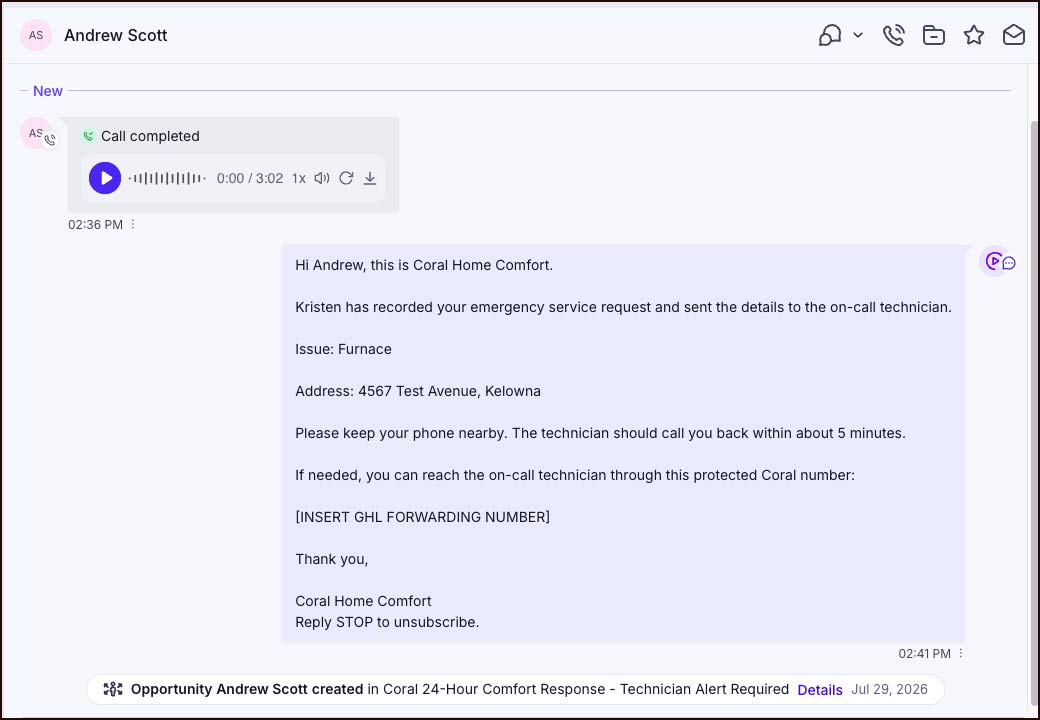
The contact timeline shows the completed call, the customer confirmation SMS, and the opportunity being created in the Coral 24-Hour Comfort Response pipeline.
Why This Version Feels Different
The customer is no longer left wondering whether someone will call. Kristen states that the on-call technician will receive the details and call summary by text, asks the customer to keep the phone nearby, and sets the expectation of a callback within about five minutes.
Customer Confirmation: Reassurance After the Call
The customer SMS is important because it removes the uncertainty that can happen after an emergency call. It confirms the request was recorded, states the issue and address, and explains that the technician should call back shortly.
The customer receives written confirmation after the call. The placeholder forwarding number should be replaced with Coral’s protected GHL forwarding number before live use.
Customer SMS Preview
This SMS protects Steve’s personal cell number while still giving the customer a direct, confidence-building path to the on-call technician.
Behind the Scenes: Contact Record and Emergency Fields
Kristen turns the conversation into structured GHL data. This gives the technician and office team something much more useful than a basic voicemail.
Contact Identity
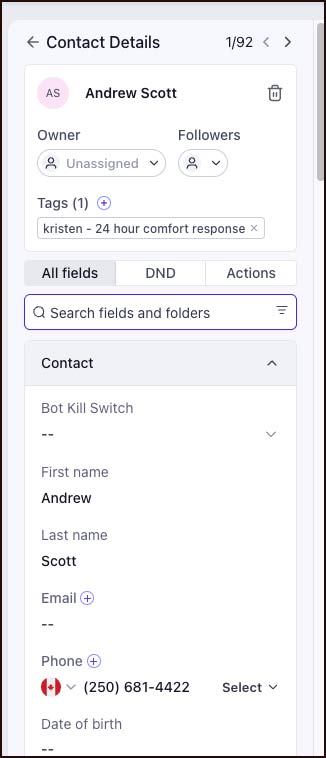
The caller’s name and phone number are saved on the contact record.
Service Address
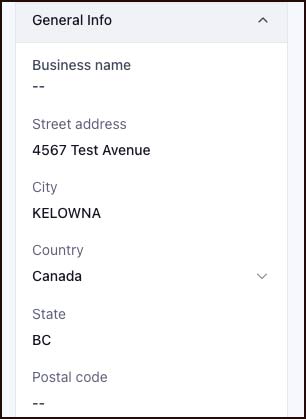
The service address and city are saved in the contact record so the technician knows where help is needed.
Problem and Equipment
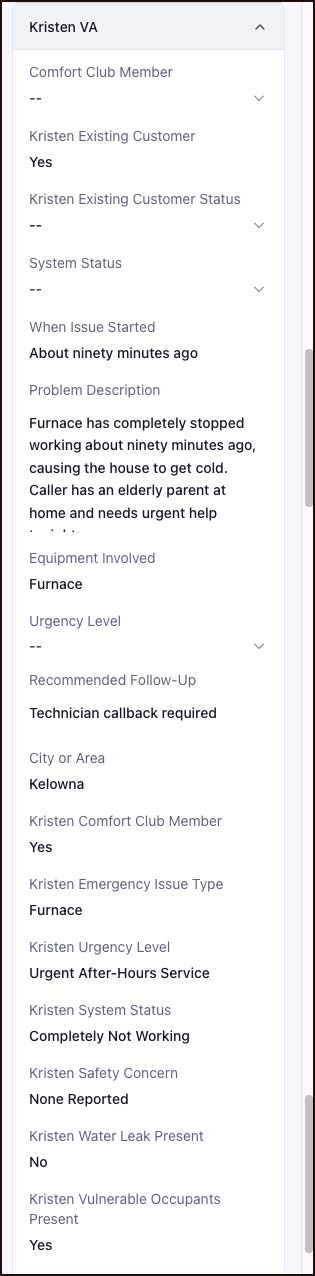
Kristen records when the issue started, the problem description, and the equipment involved.
Urgency and Follow-Up
The request is marked as urgent after-hours service with technician callback required.
Safety and Occupants
Kristen confirms the system is completely down, no safety concern is reported, no water leak is present, and a vulnerable occupant is in the home.
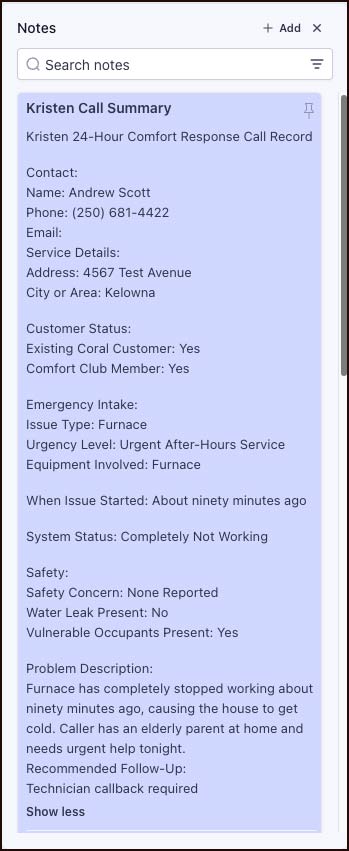
Technician-Ready Note
The custom Kristen Call Summary organizes the case into contact, service, customer status, emergency intake, safety, and next-step sections.
Two Technician Alerts: Wake-Up First, Full Details Second
This is the operational upgrade Steve wanted. The technician does not have to wait for the full post-call summary before knowing an urgent call is happening. A short wake-up alert goes first, then the full call summary follows after the fields populate.
Why Two Messages Matter
- The first message acts as a wake-up alert for late-night emergencies.
- The technician knows an urgent call is in progress or has just completed.
- The full summary follows shortly with name, phone, address, issue, urgency, and problem description.
- The process protects Steve’s personal number by using a GHL forwarding number.
- The system creates accountability and a cleaner audit trail.
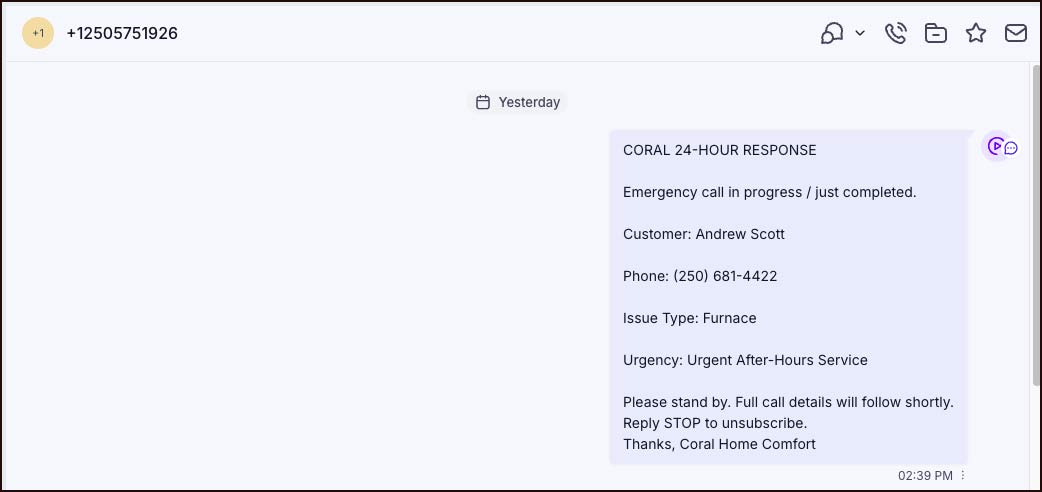
Wake-up text: the technician is alerted that an emergency call is in progress or has just completed.
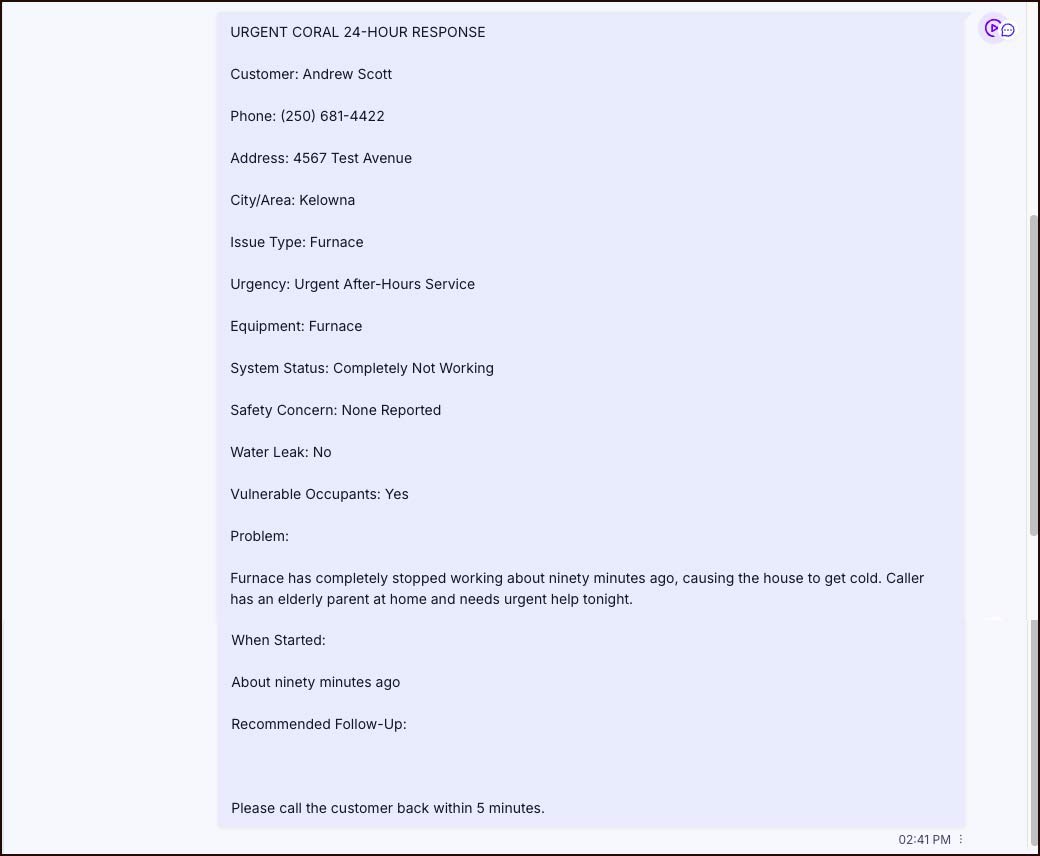
Full technician summary: customer, phone, address, issue type, urgency, equipment, safety status, problem description, and callback instruction.
The full technician text gives Steve or the on-call technician the information needed before calling the customer back.
Full Technician Summary Includes
- Customer name and phone number.
- Service address and city.
- Issue type and urgency.
- Equipment involved.
- System status.
- Safety concern, water leak, and vulnerable occupant status.
- Plain-English problem description.
- Instruction to call the customer back within five minutes.
Readable Notes for Review and Quality Control
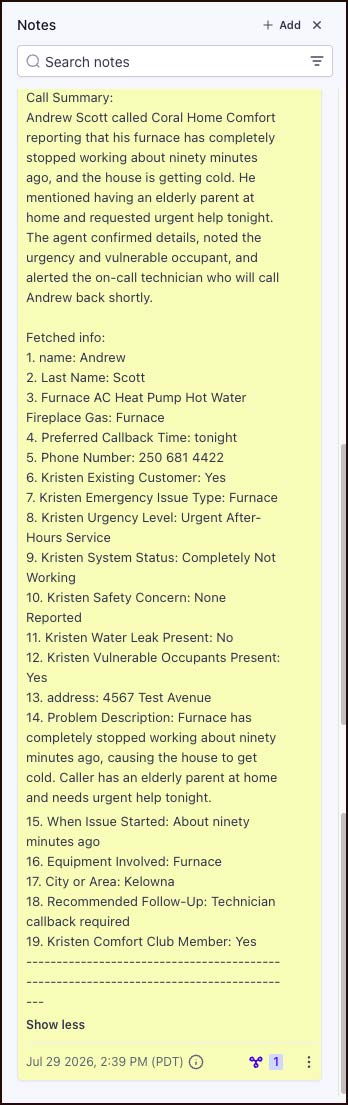
The contact record carries both a custom Kristen Call Summary and a GHL AI-generated call summary. This gives the team a structured view and a plain-English recap of the conversation.
The custom summary presents the case in a technician-ready format.
The AI-generated summary confirms the call content and lists the fetched fields for review.
Refinement From This Test
The workflow is now much stronger than the first version. The remaining polish is to replace the placeholder forwarding number, decide whether urgent calls should land in Technician Alert Required or Technician Alerted, and continue tightening issue classification so no-heat calls can display as No Heat while equipment remains Furnace.
Pipeline Visibility: Emergency Work Is Now Trackable
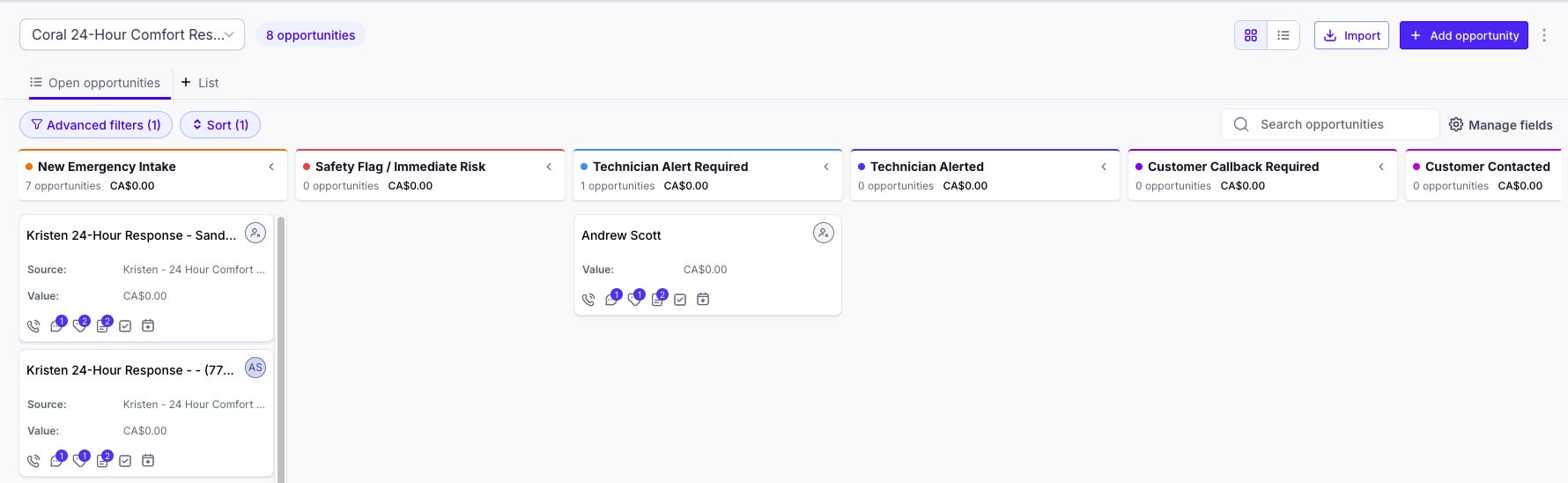
The latest workflow no longer leaves every emergency in the first intake column. This test successfully routed the opportunity into the technician alert stage, making the emergency response visible to Steve and the team.
Kristen answers and collects the urgent service details.
The technician receives an early alert.
Detailed technician text is sent after the call.
The caller receives written confirmation.
The opportunity moves to the technician alert stage.
The pipeline now shows the emergency request moving beyond basic intake into the technician alert workflow.
Customer Experience Benefits
- No second phone number to write down from voicemail.
- No uncertainty about whether the request was captured.
- Clear message that the on-call technician is being sent the details.
- Written confirmation after the call.
- Protected Coral callback number instead of exposing Steve’s personal cell.
Operational Benefits for Coral
- Technician gets a wake-up alert before the full details arrive.
- Full summary reduces back-and-forth before callback.
- After-hours demand becomes visible in a pipeline.
- Managers can review call recordings, notes, messages, and fields.
- The process can be expanded into separate routing for gas smell, leaks, AC failure, quotes, and maintenance.
Demo Result: Kristen Now Supports a Stronger 24-Hour Emergency Process
This second demo shows a meaningful improvement over the original 24-hour voicemail handoff. Kristen answers the call, captures the emergency details, recognizes vulnerable occupants, triggers a technician wake-up alert, sends the full technician summary, texts the customer, creates a GHL note, and routes the opportunity into the emergency pipeline.
What Steve and the team should see:
- The customer is reassured instead of being sent to voicemail instructions.
- The technician is alerted quickly and receives useful details before calling back.
- The customer is told to keep the phone nearby and expect a callback within about five minutes.
- Steve’s personal number can stay protected behind a GHL forwarding number.
- The call becomes a complete operational record inside GHL.
- The pipeline gives Coral visibility into what happened after hours.
This is the practical value of Kristen: Coral keeps the human technician in control, but the AI assistant improves the first response, the handoff, the customer confidence, and the internal record.